
Getting a right to work check wrong costs up to £45,000 per worker. Getting it right takes three minutes.
This guide covers everything UK employers need to know about right to work share codes in 2026: how to run the check, what the result means, how to handle Section 3C leave, when to use the Employer Checking Service, and what sponsored workers on a Skilled Worker or Health and Care Worker visa need to know.
Workers: There is a dedicated section on how to generate your own share code.
What Is a Right to Work Share Code?
A right to work share code is a 9-character alphanumeric code, always starting with "W", that workers with a UK digital immigration status generate through GOV.UK.
Employers use it to verify the worker's right to work online through the Home Office checking service. The code is valid for 90 days from the date it was generated. It costs nothing to create and takes less than 2 minutes.
Share codes replaced physical document checks for most non-British, non-Irish workers. Since 31 December 2024, this includes former BRP cardholders. Every visa holder now has an eVisa and uses share codes.
The legal basis for right to work checks is the Immigration, Asylum and Nationality Act 2006 (IANA 2006). Employers who conduct compliant checks gain a statutory excuse against civil liability, even if the worker later turns out not to have the right to work.
When to Run the Check: Timing Rules
Before the first day of work. That is the legal requirement. Not before the interview, not before offer: before work begins.Running the check too early creates a gap. If there is a significant delay between the check and the start date, the share code may expire (90 days), or the worker's immigration status may change. The check must reflect the worker's current status when they start.
The rules:
- The check must be completed before the worker's first day
- Check cannot be run after work has already started. Running a check after the fact does not create a statutory excuse
- For time-limited permissions, a follow-up check must be run before the permission expires
- There is no requirement to check candidates at the interview or offer stage
Discriminatory checks are illegal. You must check every new worker, British, Irish, and overseas, in the same way. Running checks only on workers who appear to be from overseas is direct race discrimination under the Equality Act 2010. The Home Office expects a consistent, non-selective approach.
Who Needs to Provide a Share Code in the UK?
Workers who use share codes:
- Skilled Worker visa holders
- Health and Care Worker visa holders
- Graduate visa holders
- EU, EEA and Swiss nationals with settled or pre-settled status under the EU Settlement Scheme
- Student visa holders
- Spouse and family visa holders
- Anyone previously on a Biometric Residence Permit (BRP) has now migrated to eVisa.
Workers who do not use share codes:
- British citizens
- Irish citizens
British and Irish nationals prove their right to work using a passport, birth certificate, or other List A documents. The IDVT route is an alternative, covered below.
List A vs List B Documents: Why the Distinction Matters
Before share codes, employers checked physical documents from two lists. Understanding the lists still matters: they explain the framework behind statutory excuse and follow-up check obligations.List A: Continuous statutory excuse
Documents proving an unrestricted, permanent right to work. Check once, no follow-up required. Examples:
- UK or Irish passport
- UK birth certificate plus proof of National Insurance number
- Certificate of Settled Status (indefinite leave to remain)
- EU Settlement Scheme settled status
List B Group 1: Time-limited, follow-up required
Documents proving a time-limited right to work. Statutory excuse lasts until expiry, after which a follow-up check is required. Examples:
- eVisa (share code check) with an expiry date
- Certificate of Application for EUSS (time-limited)
List B Group 2: Employer Checking Service required
Situations where the worker has an outstanding immigration application or appeal. Statutory excuse is only obtained via a Positive Verification Notice from the ECS.
If a worker's share code shows time-limited right to work, you are in List B Group 1 territory. Diary the follow-up check before the expiry date shown.
How to Check a Right to Work Share Code: Step-by-Step
The check takes under three minutes and creates a statutory excuse against civil penalty.
Step 1: Ask the worker for two things
Their share code and their date of birth. Nothing else. The GOV.UK service does the verification.
Step 2: Go to the GOV.UK employer checking service
URL: https://www.gov.uk/view-right-to-work
This is the employer portal. Workers use a different URL. Using the wrong one does not create a statutory excuse.
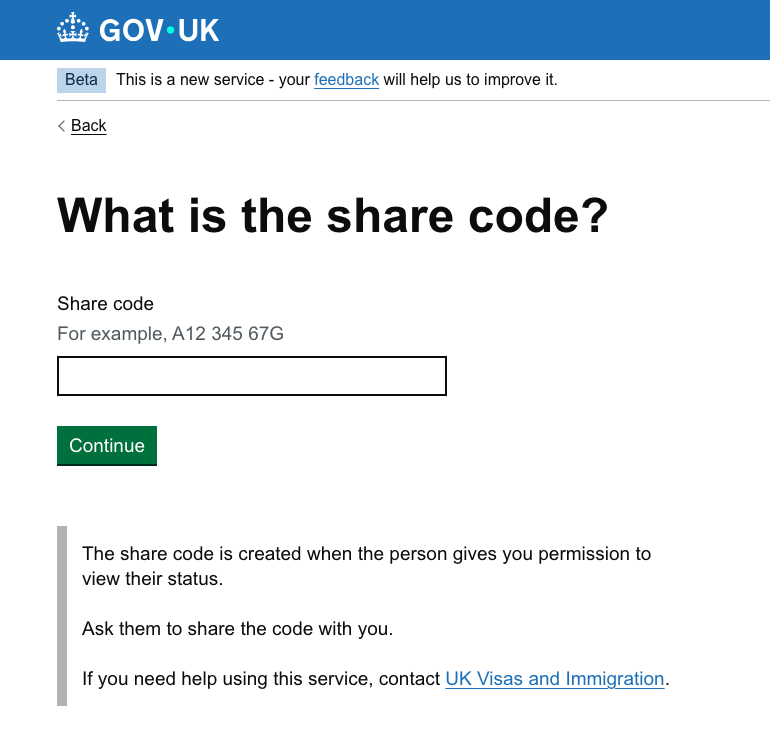
Step 3: Enter the share code and date of birth
The share code is 9 characters and starts with "W". Enter it exactly. One incorrect character results in a failed check.
Step 4: Read the result
The service returns one of two outcomes:
- "This person has the right to work in the UK": check complete, record the result.
- "We cannot confirm this person's right to work": Do not proceed. See Common Problems and ECS sections below.
Step 5: Save a record immediately
Screenshot or print the result page. Store it for the duration of employment and for two years thereafter. Record the date the check was run.
How to Check an Employee's Right to Work Share Code Online
The official employer checking service is gov.uk/view-right-to-work.
You cannot accept a screenshot from the worker as proof. Screenshots can be edited. The only compliant check is one you run yourself through the Home Office service, using the share code and the worker's date of birth.
Running the check yourself creates a statutory excuse: legal protection that applies even if the worker later loses their right to work without your knowledge. Accepting a screenshot, asking the worker to show you their phone, or relying on another employer's check does not create that protection.
Keep on file:
- A copy of the check result (screenshot or printout)
- The date the check was carried out
- The worker's name as shown on the result
- For IDVT checks: the name of the Identity Service Provider and confidence level
What the Right to Work Check Result Tells You
The result page shows more than a yes or no.
For the time-limited right to work, which covers most visa holders, it shows the exact date the worker's permission expires. That date is your follow-up trigger. Set a calendar reminder at least 3 months before the expiry date.
For indefinite right to work, covering settled status and Indefinite Leave to Remain, no expiry date appears. No follow-up check is required. This counts as a List A check.
Work restrictions: Some results include conditions on the type of work permitted. Student visa holders are typically restricted to 20 hours per week during term time. The share code result will show any such restriction. It is the employer's responsibility to ensure the work offered does not exceed the worker's permission.
Checking Specific Visa Types: Work Restrictions by Category
Skilled Worker visa
Usually unrestricted. If the visa was issued for a specific employer, the result may show "restricted to working for [employer name]." In that case, you must be the sponsoring employer, or the worker must vary their visa before starting. Browse Skilled Worker visa jobs on SponsoredJobs.
Health and Care Worker visa
Same process as Skilled Worker. The result shows the expiry date. Work is permitted in the eligible occupation for which the Certificate of Sponsorship was issued. No 20-hour restriction. See Health and Care visa jobs.
Graduate visa
Unrestricted. The worker can work in any role, for any employer, including self-employment. No follow-up check until the visa expires (2 or 3 years from completion of study).
Student visa
The result will typically show a restriction: 20 hours per week during term time, full-time during vacations. Employers must verify that the work offered complies. Student visa holders frequently breach this condition, and the employer can face liability.
Spouse and family visa
Usually unrestricted. The expiry date aligns with the family leave. A follow-up check is required before expiry.
Pre-settled status (EUSS)
Time-limited, shown with an expiry date. Follow-up check required. Workers should apply for settled status once they meet the 5-year residency requirement, at which point the result changes to indefinite.
Settled status (EUSS)
Indefinite right to work. No follow-up required. Counts as a List A check.
Right to Work Share Codes for Skilled Worker Visa Holders
This is where most guides go quiet. Here is exactly what to expect.What the check result shows for a sponsored worker:
- Full name (as registered with UKVI)
- "This person has the right to work in the UK"
- Expiry date, aligned with their Skilled Worker visa end date
- Any work restrictions (most Skilled Worker visas are unrestricted, but some are tied to a specific employer or role)
A concrete example: A hospital employs an overseas nurse on a Health and Care Worker visa. Before their start date, HR runs the share code check. The result confirms right to work with an expiry date 3 years from now, matching the Certificate of Sponsorship period. HR records the expiry date, sets a 90-day reminder, and stores the result in the employee's file. Three years later, the nurse extends their visa. HR receives a new share code and runs the check again. The new result shows the updated expiry date. Both records are retained.
The sponsorship check does not replace the right to work check. As a licensed sponsor, you have already verified the worker's eligibility for the visa route. But the right to work check is a separate legal obligation. Failing to run it removes your statutory excuse even if you are the sponsoring employer. Both must be completed.
Looking to hire sponsored workers? See our employer pricing.
How to Generate a Right to Work Share Code (For Workers)
Workers: this is your section. Share it with your employer if needed.
Share codes are generated at gov.uk/prove-right-to-work. The process takes under two minutes.
Step 1: Go to gov.uk/prove-right-to-work
Step 2: Sign in using your UKVI account (same account used to view your eVisa)
Step 3: Select "Share your right to work status with an employer"
Step 4: The service generates your 9-character share code
Step 5: Give the code and your date of birth to your employer. Not a screenshot: the code itself
Key facts:
- The code expires after 90 days. Generate a fresh one for each new employer
- There is no cost to generate a share code
- The same code can be used by multiple employers within the 90-day window
- The code reveals only your right to work status and expiry date, not your full immigration history
Right to Work Share Code vs BRP: What Changed
Until recently, workers with a Biometric Residence Permit (BRP) could hand over the physical card for employers to inspect directly.
From 31 December 2024, BRP cards are no longer valid for new right to work checks. The Home Office built that expiry date into all BRPs issued with leave extending beyond that date. Every visa holder now has a UKVI account and uses share codes.
For employers: If a new starter presents a physical BRP card, direct them to generate a share code via their UKVI account at gov.uk/evisa. Checks completed against valid BRP cards before 31 December 2024 remain compliant. No need to repeat them.
For workers who have not yet migrated: The UKVI account setup is available at gov.uk/evisa. Workers need their BRP card and a valid email address to register. The account is free and takes approximately 15 minutes to set up.
The Employer Checking Service (ECS): Full Guide
The Employer Checking Service is the Home Office's secondary verification route, used when a share code cannot be generated or when a worker is in a temporary immigration limbo.When to use the ECS:
- The worker's visa is pending renewal (applied but not yet decided)
- The worker has an outstanding appeal or administrative review
- There is a UKVI system issue preventing share code generation
- The worker holds a legacy permission not verifiable via share code
- The worker has an Application Registration Card (ARC)
Step 1: Go to gov.uk/employee-immigration-employment-status
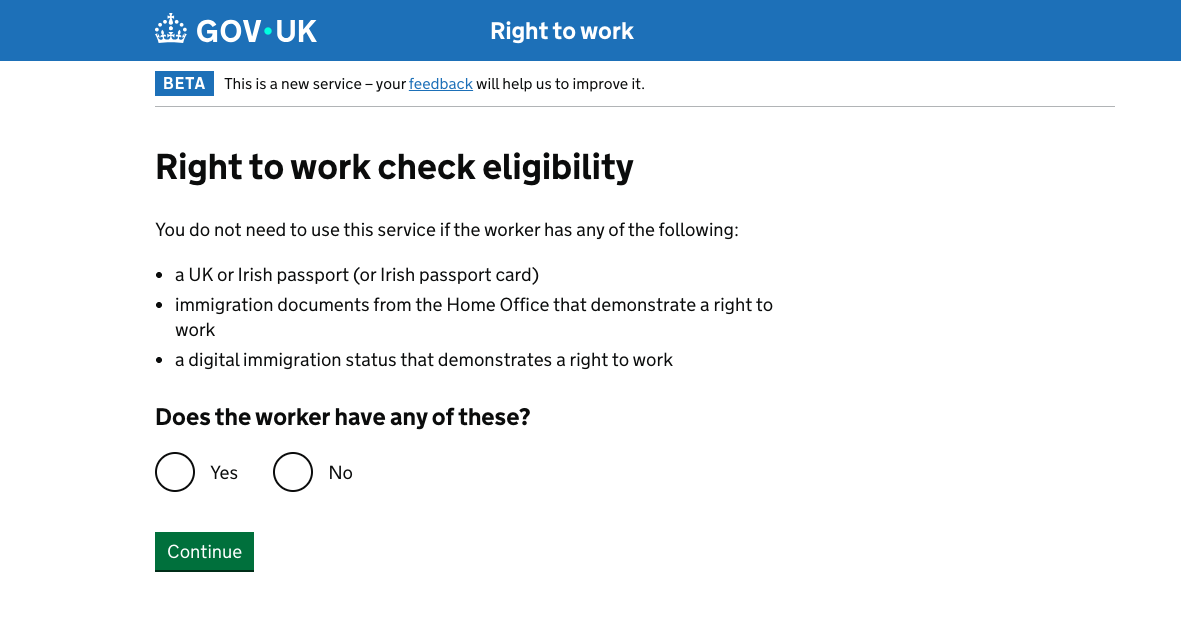
Step 2: Submit the request. You will need the worker's name, date of birth, nationality, and Home Office reference number from their application acknowledgement.
Step 3: The Home Office responds with a Positive Verification Notice (PVN) or a No Positive Verification Notice.
Step 4: A PVN confirms right to work and gives a statutory excuse for 6 months.
Step 5: After 6 months, if no decision has been made, contact ECS again for an updated check.
What a Positive Verification Notice gives you:
- Confirmation of right to work at the date of issue
- A 6-month statutory excuse window
- A reference number to store alongside the worker's records
A PVN is not indefinite. If the worker's application is still unresolved after 6 months, re-check via ECS. If the worker receives a negative decision, you are legally obligated to cease their employment.
Section 3C Leave: Checking Workers Mid-Application
This catches employers out more than almost anything else.
Under Section 3C of the Immigration Act 1971, when a worker applies to extend or vary their leave before it expires, their existing permission automatically continues until the application is decided or any appeal is resolved.
The problem: The worker's share code will show their original visa expiry date, not the extended 3C period. The check may appear to show an expired visa even though the worker legally has the right to work.
What to do:
- Ask the worker to show proof of their application acknowledgement (the Home Office sends a letter or email confirming receipt)
- Use the Employer Checking Service, not the share code checker, to verify their status
- A Positive Verification Notice from ECS confirms right to work under Section 3C
Key facts about Section 3C leave:
- Only applies if the application was submitted before the original visa expired. A late application does not trigger 3C
- The worker retains the same conditions as their original visa during 3C. Restrictions on hours and employer remain in place
- If the Home Office refuses the application and no appeal is lodged within the deadline, 3C leave ends immediately
- Section 3C leave lapses immediately if the individual leaves the UK
Relevance for sponsors: Skilled Worker visa holders switching employers need a new Certificate of Sponsorship and a visa application. During the application period, their existing permission continues under 3C. You can employ them before the new visa is issued, but only after ECS verification confirms this.
IDVT: Digital Checks for British and Irish Workers
From 6 April 2022, employers can use certified Identity Service Providers (IDSPs) to carry out digital right to work checks for British and Irish citizens.
Identity Document Verification Technology allows workers to verify their identity digitally using a smartphone to scan their passport or driving licence. The IDSP returns a result confirming identity has been verified to a "Medium" or "High" level of confidence.
When it applies: British and Irish citizens only. IDVT does not apply to workers with immigration status. Those workers must use the share code route.Requirements for a compliant IDVT check:
- Must use a Home Office-certified IDSP
- Must achieve at least a "Medium" level of confidence
- Must confirm the photo on the identity document matches the worker's appearance
A compliant IDVT check creates a statutory excuse. An uncertified digital check does not. Costs vary by provider — contact certified IDSPs directly for pricing.
Record Keeping: What to Store, How Long, and GDPR
A right to work check is only useful if you can produce the record during an audit. Here is exactly what to keep.What to store:
- A clear copy of the check result (screenshot or printout of the GOV.UK result page)
- The date the check was carried out
- For share code checks: the share code used and the worker's date of birth
- For ECS checks: the Positive Verification Notice reference number
- For IDVT checks: the IDSP's report and confidence level
- For document checks: a clear copy of every document checked
How long to keep records: Retain right to work records for the duration of employment plus two years. The two-year clock starts from the termination date.
Digital or physical? Either is acceptable. Password-protected PDFs stored in an HR system are common. Cloud storage is acceptable provided it meets data security requirements.
GDPR obligations: Right to work records contain personal data. They must be stored securely, accessible only to those with a legitimate need, deleted after the retention period expires, and covered by your privacy notice. Holding records longer than necessary breaches the data minimisation principle under UK GDPR. The ICO's guidance is at ico.org.uk.
Common Share Code Problems and How to Fix Them
"Code not found"
The code must start with "W" and be exactly 9 characters. A zero mistaken for the letter O is the most common cause. Ask the worker to read it character by character.
Date of birth mismatch
The DOB must match what the worker registered with UKVI, not necessarily their passport. Ask the worker to log into their UKVI account and confirm the registered date of birth.
Code expired
Share codes expire after 90 days. Ask the worker to generate a new one. No cost, under two minutes.
Worker cannot generate a share code
Use the Employer Checking Service. Also applies during a visa renewal period (Section 3C leave).
Check shows expired visa but worker says they have applied to extend
This is the Section 3C scenario. Request the Home Office acknowledgement letter and use the ECS. Do not proceed on the share code result alone.
Worker's result shows work restrictions
Read the restriction carefully. If the role you are offering exceeds what is permitted, you cannot employ the worker in that capacity until their visa status changes.
What Happens During a Home Office Audit
The Home Office conducts compliance audits on employers, both announced and unannounced.What triggers an audit:
- Intelligence from HMRC, DWP, or other government departments
- Tip-offs from workers or former employees
- Random compliance visits
- Prior civil penalty history
- Sector targeting: construction, hospitality, and care sectors receive higher scrutiny
What auditors check:
- Right to work records for every current employee
- Records for employees who left in the past two years
- That records were obtained before the first day of work
- That follow-up checks were completed before time-limited permissions expired
- That the correct checking method was used for each worker type
Home Office Immigration Enforcement officers have the right to enter business premises to inspect right to work records under the Immigration Act 1971. No warrant is required.If the Home Office finds a breach, they issue a civil penalty notice. You have 28 days to pay, agree an instalment plan, or object.
Right to Work Checks and TUPE
When a business transfers under TUPE 2006, employees transfer automatically to the new employer.The Home Office's guidance states that a check completed by the previous employer, stored in the employee's record, may be relied upon by the new employer. However:
- The previous employer must have kept compliant records
- Those records must transfer with the employee
- The new employer should audit records received to confirm compliance
- For time-limited permissions, follow-up checks remain the new employer's responsibility from the date of transfer
Conduct a right to work audit as part of TUPE due diligence. Identify employees with expiring time-limited permissions. Where records are missing or non-compliant, run fresh checks immediately.
Employer Penalties for Right to Work Failures
- Up to £45,000 per illegal worker: first offence (in force from 13 February 2024)
- Up to £60,000 per illegal worker: repeat offences
- Up to 5 years imprisonment: knowingly employing someone without the right to work (Section 21, IANA 2006)
Criminal liability requires the employer to have known, or had reasonable cause to believe, that the worker did not have the right to work. Civil penalties apply regardless of knowledge.
The three factors that determine penalty level:
- Whether it is a first or repeat offence
- Whether you cooperate with the investigation
- Whether you have documented policies and staff training in place
How to Appeal a Civil Penalty
If the Home Office issues a civil penalty, you have three options within 28 days:
Option 1: Pay
Pay the full amount within 28 days, or agree a payment plan.
Option 2: Object
Submit a formal objection. Grounds include:
- You conducted a compliant right to work check. Include your records as evidence
- The penalty amount is disproportionate
- You were not the employer at the relevant time
Option 3: Appeal to the Immigration Tribunal
If your objection is rejected, appeal to the First-tier Tribunal (Immigration and Asylum Chamber) within 28 days of the objection decision.
What strengthens an appeal:
- Complete, timestamped right to work records
- Evidence of staff training on right to work procedures
- A documented HR policy covering right to work checks
- Evidence the breach was isolated, not systemic
The civil penalty code of practice: gov.uk/government/publications/right-to-work-checks-employers-guide.
Frequently Asked Questions
What is a share code right to work check?
A share code right to work check is the process employers use to verify a worker's immigration status online. The worker generates a 9-character share code at gov.uk/prove-right-to-work and gives it to the employer, who enters it alongside the worker's date of birth at gov.uk/view-right-to-work. The Home Office service returns a result confirming whether the worker has the right to work in the UK.
Can I accept a screenshot of a share code as proof?
No. The compliant check is one the employer runs themselves at gov.uk/view-right-to-work. A screenshot has no legal standing and does not create a statutory excuse.
How long is a right to work share code valid?
90 days from the date it was generated. Ask the worker to generate a new one if it has expired.
Do British citizens need a share code?
No. British and Irish citizens use a passport, birth certificate, or other List A documents. Employers can also use a certified IDSP for digital verification.
What if a worker cannot generate a share code?
Use the Employer Checking Service at gov.uk/employee-immigration-employment-status. Relevant when a visa renewal is pending (Section 3C leave).
Can the same share code be used by more than one employer?
Yes. It is valid for 90 days regardless of how many employers use it. Each employer must run their own independent check.
Does a Skilled Worker visa holder need a new share code when they change employers?
The existing code stays valid for 90 days. The new employer must run the check themselves. They cannot rely on a previous employer's result.
What happens when a sponsored worker's visa is renewed?
The worker generates a new share code once the renewal is approved. Run a fresh check and update records with the new expiry date.
Do I need to check agency workers?
If you are the end-hirer, the statutory obligation typically sits with the agency. If you have a direct employment relationship, you must check. Contracts should confirm who holds the obligation.
Is there a difference between right to work and right to rent?
Yes. Right to work applies to employees. Right to rent applies to residential tenants. Both use share codes for overseas nationals, but they are separate legal obligations.
What if I am employing someone who works remotely from abroad?
The right to work check obligation applies to workers employed to work in the UK. Remote workers based permanently overseas are generally not subject to UK right to work requirements.
Updated: May 2026
SponsoredJobs lists UK jobs from employers on the Home Office register of licensed sponsors. Every listing is verified against an active sponsor licence, eligible SOC code, and the current salary threshold. Browse verified sponsored jobs
Looking for a role that meets the going rate?
Browse UK jobs verified against the latest thresholds — sponsor licence, occupation and salary all checked.